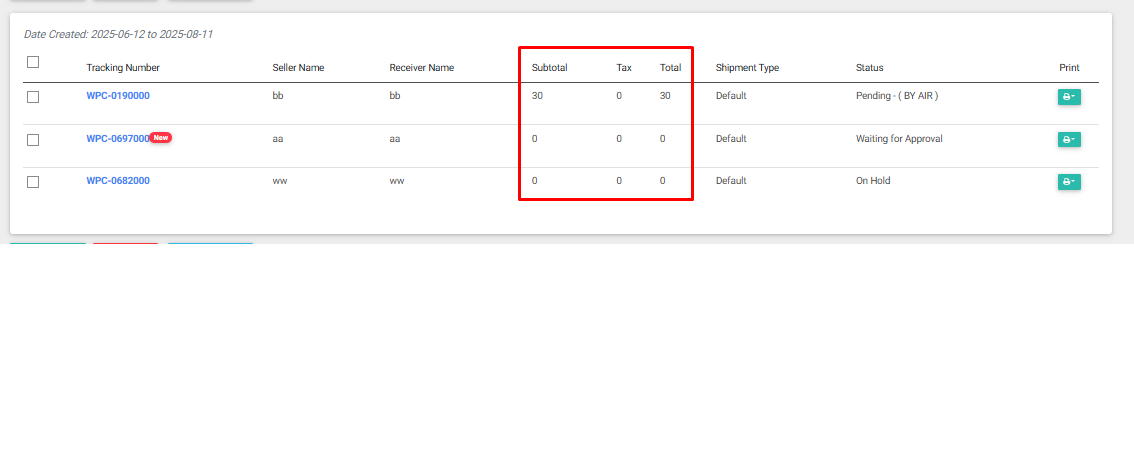
NOTE: Invoice Addon is required. Please check here.
Code goes to your active theme’s functions.php file:
function wpcfe_custom_invoices_shipment_table_header_callback(){
    echo "<th>Subtotal</th>";
    echo "<th>Tax</th>";
    echo "<th>Total</th>";
}
add_action('wpcfe_shipment_table_header', 'wpcfe_custom_invoices_shipment_table_header_callback');
function wpcfe_custom_invoices_shipment_table_data_callback( $shipment_id ){
    $invoice_breakdown = array();
    if(function_exists('wpcinvoice_get_total_value')) {
         $invoice_breakdown = wpcinvoice_get_total_value($shipment_id);
    }
    $sub_total = ($invoice_breakdown['sub_total'] ?? 0) ?: 0;
    $tax = ($invoice_breakdown['tax'] ?? 0) ?: 0;
    $total = ($invoice_breakdown['total'] ?? 0) ?: 0;

    $data = "<td>";
    $data .= $sub_total;
    $data .= "</td>";

    //Another data
    $data .= "<td>";
    $data .= $tax;
    $data .= "</td>";

    //Custom data
    $data .= "<td>";
    $data .= $total;
    $data .= "</td>";
    echo $data;
}
add_action("wpcfe_shipment_table_data", "wpcfe_custom_invoices_shipment_table_data_callback");