Replace existing template
Follow below steps to customize your shipment invoice layout.
- Create wpcargo directory in your theme directory. (e.g. child-theme/wpcargo/).
- Create a new file and name it invoice.tpl.php.
Note: This will return an empty template.
Remove sections
Copy following codes in your theme’s functions.php file. Note: Only copy the code of the section you want to remove.
add_action( 'admin_init', 'remove_invoice_sections' );
function remove_invoice_sections(){
	global $wpcargo_print_admin;
	//Remove header section
	remove_action( 'admin_print_header', array( $wpcargo_print_admin, 'wpcargo_print_header_template' ) );

	//Remove shipper and receiver sections
	remove_action( 'admin_print_shipper', array( $wpcargo_print_admin, 'wpcargo_print_shipper_template' ) );

	//Remove shipment information and additional sections
	remove_action( 'admin_print_shipment', array( $wpcargo_print_admin, 'wpcargo_print_shipment_template' ), 10 );
}
Add content on header section
add_action( 'admin_print_header', 'custom_print_header_section' );
function custom_print_header_section( $shipment_detail ){
	echo '<p>This is a custom section for the header section</p>';
}

Add content on shipper/receiver section
add_action( 'admin_print_shipper', 'custom_print_shipper_section' );
function custom_print_shipper_section( $shipment_detail ){
	echo '<p>This is a custom section for the shipper/receiver section</p>';
}

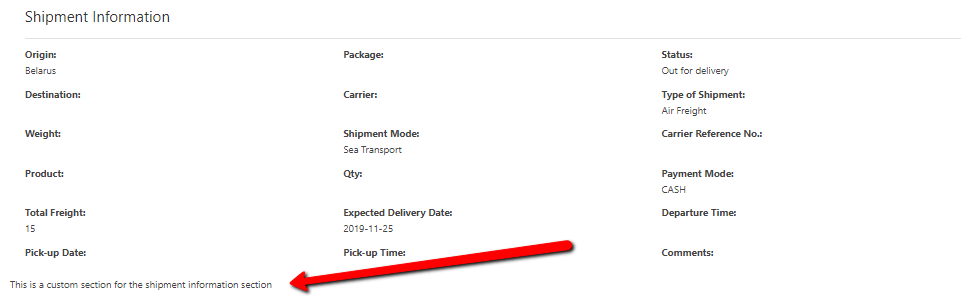
Add content on shipment information section
add_action( 'admin_print_shipment', 'custom_print_shipment_info_section' );
function custom_print_shipment_info_section( $shipment_detail ){
	echo '<p>This is a custom section for the shipment information section</p>';
}
add_filter( 'wpccf_additional_sections', 'remove_custom_section_in_print' );
function remove_custom_section_in_print( $custom_sections ){
	if( isset( $_GET['page'] ) && $_GET['page'] == 'wpcargo-print-layout' ){
		unset( $custom_sections['custom_section'] );
	}
	return $custom_sections;
}