

Add the following code in your theme’s functions.php file.
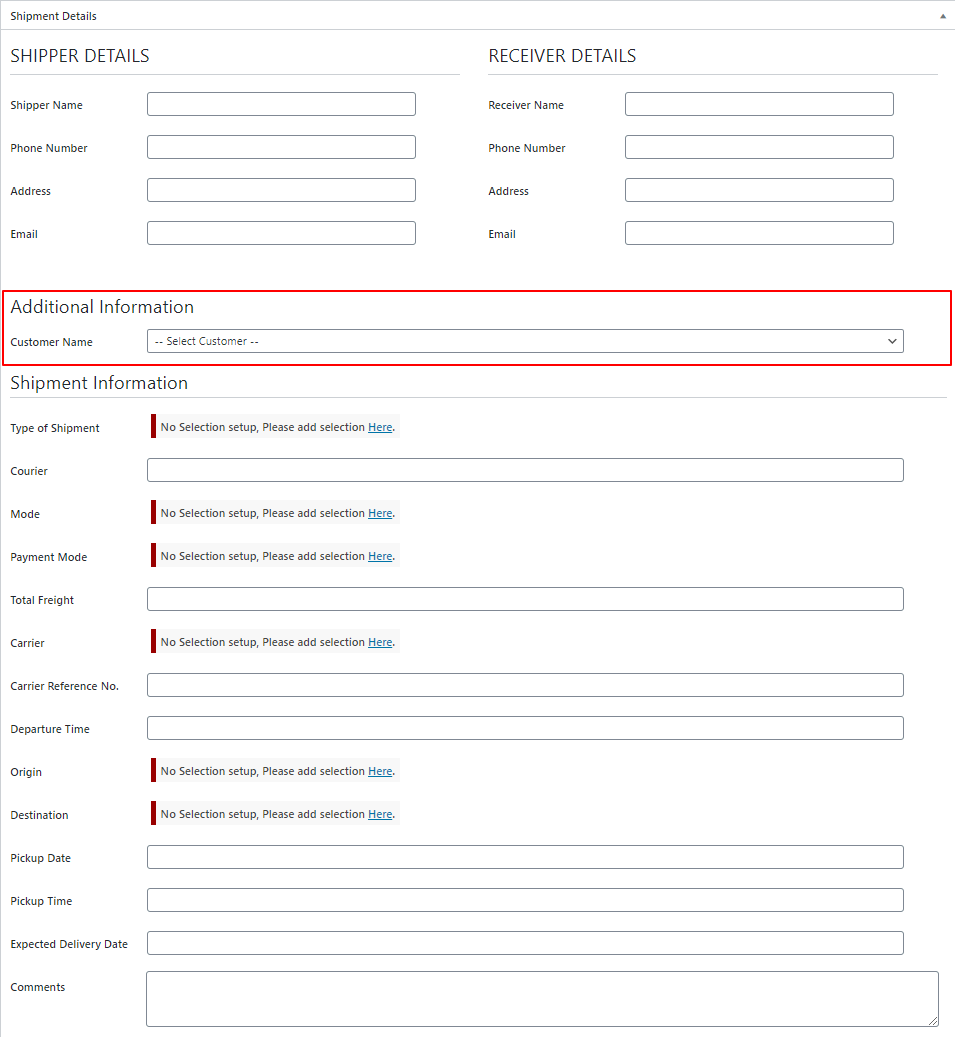
This adds the dynamic field at the top of the shipment information section
add_action( 'wpcargo_before_shipment_meta_section', 'custom_shipment_info_additional_field' );
function custom_shipment_info_additional_field( $shipment_id ){
    global $wpcargo;
    if( !$shipment_id ){
        $shipment_id = 0;
    }
    $customer = get_post_meta( $shipment_id, 'customer_fields', true );
    $args = array(
        'role__in'  => array('wpcargo_client'),
        'orderby'   => 'display_name',
        'order'     => 'ASC'
    );
    $users  = array();
    if( !empty( get_users( $args ) ) ){
        foreach ( get_users( $args ) as $user ) {
           $users[$user->ID] = $wpcargo->user_fullname( $user->ID );
        }
    }
    ?>
    <div id="form-client-list" class="wpcargo-field-section">
        <h1>Additional Information</h1>
        <table class="wpcargo form-table">
            <tbody><tr>
                <th><label>Customer Name</label></th>
                <td>
                    <select name="customer_fields" class="mdb-select mt-0 form-control browser-default" id="customer_fields" required="">
                        <option value=""><?php _e('-- Select Customer --','wpcargo-frontend-manager'); ?></option>
                        <?php if( !empty( $users ) ): ?>
                            <?php foreach( $users as $key => $value ): ?>
                                <option value="<?php echo $key; ?>" <?php selected( $customer, $key ); ?>><?php echo $value; ?></option>
                            <?php endforeach; ?>
                        <?php  endif; ?>
                    </select>
                </td>
            </tr>
        </table>
    </div>
    <?php
}
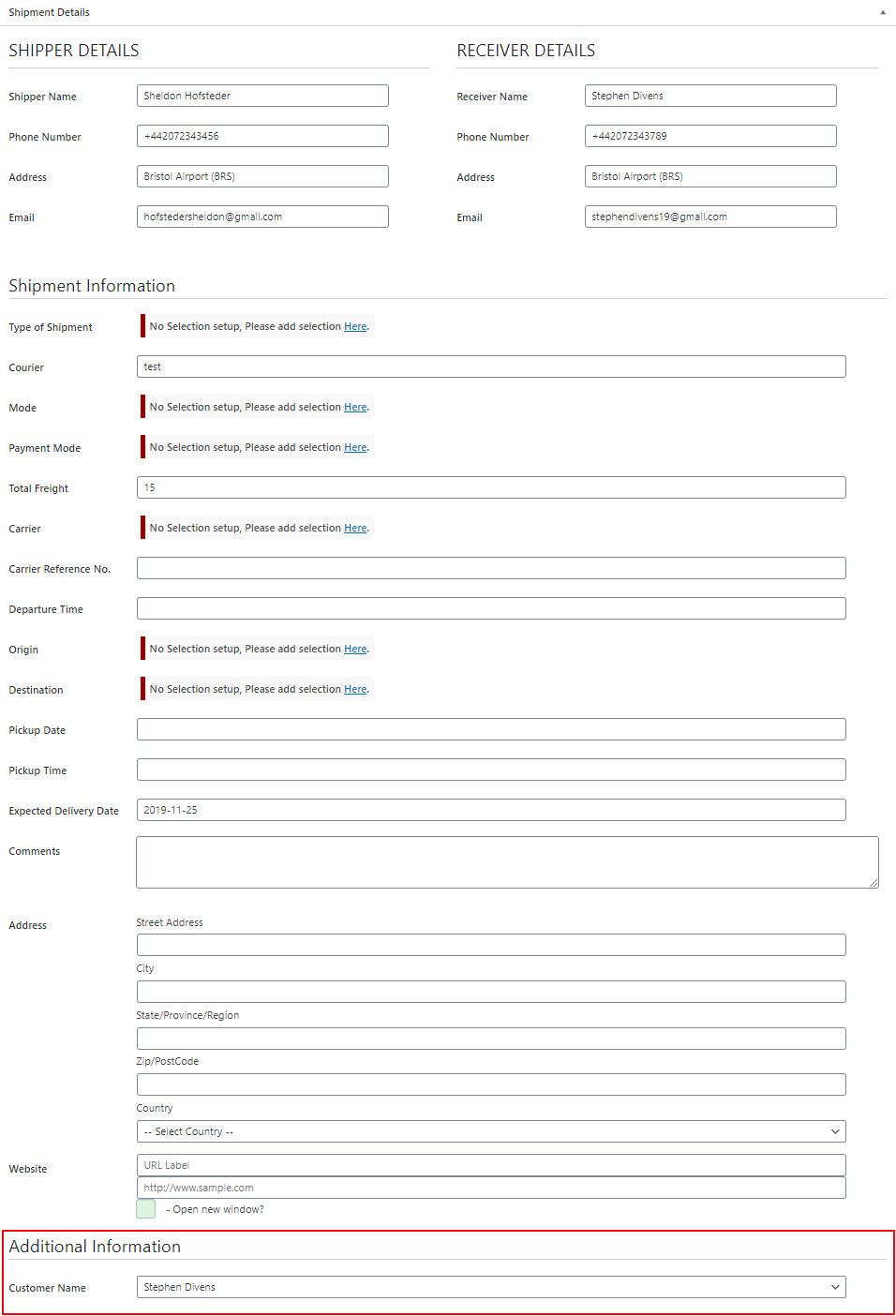
This adds the dynamic field at the bottom of the custom section
add_action( 'wpcargo_after_shipment_meta_section', 'custom_shipment_info_additional_field' );
function custom_shipment_info_additional_field( $shipment_id ){
    global $wpcargo;
    if( !$shipment_id ){
        $shipment_id = 0;
    }
    $customer = get_post_meta( $shipment_id, 'customer_fields', true );
    $args = array(
        'role__in'  => array('wpcargo_client'),
        'orderby'   => 'display_name',
        'order'     => 'ASC'
    );
    $users  = array();
    if( !empty( get_users( $args ) ) ){
        foreach ( get_users( $args ) as $user ) {
           $users[$user->ID] = $wpcargo->user_fullname( $user->ID );
        }
    }
    ?>
    <div id="form-client-list" class="wpcargo-field-section">
        <h1>Additional Information</h1>
        <table class="wpcargo form-table">
            <tbody><tr>
                <th><label>Customer Name</label></th>
                <td>
                    <select name="customer_fields" class="mdb-select mt-0 form-control browser-default" id="customer_fields" required="">
                        <option value=""><?php _e('-- Select Customer --','wpcargo-frontend-manager'); ?></option>
                        <?php if( !empty( $users ) ): ?>
                            <?php foreach( $users as $key => $value ): ?>
                                <option value="<?php echo $key; ?>" <?php selected( $customer, $key ); ?>><?php echo $value; ?></option>
                            <?php endforeach; ?>
                        <?php  endif; ?>
                    </select>
                </td>
            </tr>
        </table>
    </div>
    <?php
}
Following code works as saving of the data of your custom field
add_action( 'save_post', 'save_custom_shipment_info_additional_field' );
function save_custom_shipment_info_additional_field( $shipment_id ){
	update_post_meta( $shipment_id, 'customer_fields', $_POST['customer_fields'] );
}